Comparison
GetResponse vs Mailchimp: Best Email Platform for Solopreneurs in 2026?
Mailchimp used to be the default answer to “what email tool should I use.” For a lot of solopreneurs it still is, mostly out of habit — it’s the tool everyone’s heard of, the one every course and blog post assumes you’re already using. GetResponse has spent the last few years quietly building a case that it deserves that spot instead, stacking automation, landing pages, webinars, and course tools into the same subscription while Mailchimp has been trimming its free tier and pushing more features up the pricing ladder.
Both are legitimate options in 2026, but they’re no longer as similar as their reputations suggest. This guide compares real, current pricing and feature limits for each platform, so you can figure out which one actually fits a one-person business rather than which one you’ve simply heard of more. If you haven’t settled on email marketing software at all yet, our best email marketing software for solopreneurs roundup is a good starting point before you commit to either.
Quick verdict
If you only read one section, read this one.
- Pick GetResponse if you want automation, landing pages, and (eventually) webinars or a course area without paying separately for each, and you’re comfortable with a slightly busier interface.
- Pick Mailchimp if you want the most recognizable, integration-heavy option and your needs are mostly straightforward campaigns rather than complex funnels.
- Budget-tightest solopreneurs should look closely at GetResponse’s free plan — 500 contacts with actual automation and landing pages beats Mailchimp’s free plan, which was cut to 250 contacts with no automation at all in January 2026.
- Anyone already deep in the Shopify/WooCommerce ecosystem may find Mailchimp’s integration maturity worth the higher price, at least until GetResponse’s ecommerce tools catch up.
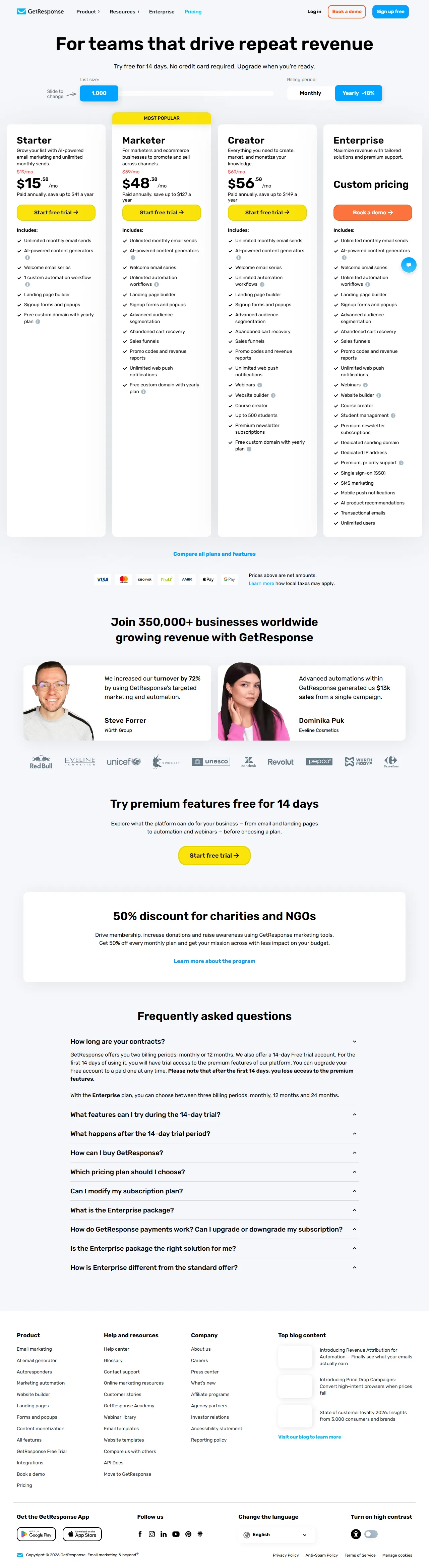
GetResponse pricing page, captured July 2026.
GetResponse vs Mailchimp at a glance
| Product | Best for | Starting price | Rating | Link |
|---|---|---|---|---|
| GetResponse | Automation, funnels, webinars & courses in one plan | $0/mo (Free, 500 contacts) | Not yet rated | Visit site |
| Mailchimp | Brand-name reliability & integration breadth | $0/mo (Free, 250 contacts) | Not yet rated | Visit site |
GetResponse overview
GetResponse
Best for: Solopreneurs who want automation, landing pages, and webinars/courses bundled with email
Starting price: $0/mo (Free plan, 500 contacts)
Pros
- Free plan includes unlimited landing pages, basic automation, and an AI course creator
- Marketer plan unlocks unlimited automation and abandoned cart recovery at a competitive price
- Webinars and course hosting are native on the Creator plan
Cons
- Starter plan caps AI tools and advanced segmentation
- Busier interface than Mailchimp, since it covers more ground
GetResponse started as an email service provider but has spent several years expanding into a broader marketing platform: email campaigns and automation, a landing page and website builder, sales funnels, webinar hosting, and a course creator, all under one login. For a solopreneur trying to avoid a stack of five separate subscriptions, that consolidation is a real selling point.
The Free plan covers up to 500 contacts and 2,500 emails per month, and — unusually for a free tier — it includes unlimited landing pages (capped at 1,000 monthly visitors), basic marketing automation workflows (without the dynamic segment filter), signup forms, and the AI course creator for up to 250 students. That’s a genuinely more feature-complete free plan than most competitors offer.
Paid tiers start at Starter, $19/month for 1,000 contacts ($15.58/month billed annually), which adds unlimited email sends and one automation workflow but caps AI tools at three uses and withholds advanced segmentation. Marketer, $59/month for 1,000 contacts ($48.38/month annually), is the plan most solopreneurs running an actual funnel will want — it unlocks unlimited automation workflows, advanced segmentation, abandoned cart recovery, sales funnels, and up to five user seats. Creator, $69/month for 1,000 contacts ($56.58/month annually), adds a website builder, course creation for up to 500 students, premium newsletters, and webinar hosting. An Enterprise tier with custom pricing adds SMS marketing, dedicated IP, and single sign-on.
Mailchimp overview
Mailchimp
Best for: Solopreneurs who want a well-known, integration-rich tool for straightforward email campaigns
Starting price: $0/mo (Free plan, 250 contacts)
Pros
- Deepest third-party integration ecosystem of any mainstream email tool
- Clean, fast-to-learn template editor
- Standard plan's automation ('Customer Journeys') is capable once you're past the entry tier
Cons
- Free plan cut to 250 contacts and 500 sends/month in January 2026, with automation removed entirely
- Landing pages and deeper automation cost more, tier for tier, than GetResponse's equivalents
Mailchimp built its reputation on being the easiest on-ramp into email marketing, and for straightforward campaign sending, that reputation still mostly holds. Where it’s changed is the free tier and the pricing ladder above it — both have gotten less generous over the past few years as Mailchimp (now part of Intuit) has pushed more monetization into every plan level.
The Free plan was reduced in January 2026 to just 250 contacts, with a send limit of 500 emails per month (250 per day). It’s come down from 2,000 contacts in 2022 to 500 in 2023 to 250 now. Automation workflows were removed from the free tier entirely by mid-2025, along with A/B testing, scheduling, and custom-coded templates — the free plan today is essentially “send a basic broadcast to a small list,” not a platform to build a real workflow on.
Paid tiers start at Essentials, $13/month for 500 contacts (monthly send limit of 10x your contact count), which restores A/B testing, scheduling, three audiences, and email/chat support. Standard, $20/month for 500 contacts (12x send limit), adds Customer Journeys automation with up to 200 automation points, five audiences, custom templates, and popup forms — this is the tier where Mailchimp’s automation actually becomes competitive. Premium, $350/month, is built for teams and higher-volume senders: unlimited contacts, advanced automations, predictive segmentation, and phone support. Pricing on every paid tier scales up as your contact count grows, with a 15% discount available at 10,000+ contacts.
Pricing at a glance
(affiliate link)| Plan tier | GetResponse | Mailchimp |
|---|---|---|
| Free plan | 500 contacts, 2,500 emails/mo, unlimited landing pages (1,000 visits/mo), basic automation | 250 contacts, 500 sends/mo (250/day), no automation, 1 user seat |
| Entry paid tier | Starter, $19/mo (1,000 contacts) — unlimited sends, 1 automation workflow, AI tools capped | Essentials, $13/mo (500 contacts) — A/B testing, scheduling, 3 audiences |
| Mid tier | Marketer, $59/mo (1,000 contacts) — unlimited automation, abandoned cart recovery, funnels | Standard, $20/mo (500 contacts) — Customer Journeys automation, 5 audiences, custom templates |
| Top tier | Creator, $69/mo (1,000 contacts) — website builder, courses, webinars | Premium, $350/mo — unlimited contacts, advanced automation, predictive segmentation |
The structural difference: GetResponse’s Marketer plan, at $59/month, packs in unlimited automation, funnels, and abandoned cart recovery — features that on Mailchimp require jumping all the way to Standard for basic automation, or Premium for the advanced version, at a much higher price. Mailchimp’s entry tiers are cheaper in absolute dollars at low contact counts, but you’re paying for less.
Email marketing
Both platforms handle core campaign sending — broadcasts, sequences, templates, basic reporting — competently. Mailchimp’s editor is arguably a half-step more polished and beginner-friendly, and its template library and pre-built content blocks are extensive. GetResponse’s editor has closed most of that gap in recent years and adds an AI campaign generator even on the free plan, which Mailchimp reserves for paid tiers.
Where it matters more: Mailchimp removed automation from its free plan entirely, while GetResponse keeps basic automation workflows in its free tier (just without the dynamic segment filter). If you’re not ready to pay yet but want to test whether automated sequences actually help your business, that’s a meaningful practical difference, not just a marketing footnote.
Landing pages & funnels
This is one of GetResponse’s clearest advantages. Its free plan includes unlimited landing pages (capped at 1,000 monthly visitors), and paid plans add a website builder and full sales funnels — opt-in pages, sales pages, order bumps — starting at the Marketer tier. For a solopreneur running any kind of lead magnet or product launch, that’s meaningful functionality included in a mid-tier subscription.
Mailchimp’s landing page tools exist but are less central to the product and less funnel-oriented — you can build a single page to capture signups or promote a product, but there’s no true multi-step funnel logic comparable to GetResponse’s sales funnel builder. If your workflow depends on a real funnel rather than a single landing page, GetResponse is built for that use case and Mailchimp isn’t.
Deliverability
Both companies have long-standing sending infrastructure and generally solid inbox placement reputations — neither is a red flag choice. Mailchimp’s scale and brand recognition give it a slight edge in perceived trustworthiness with subscribers and spam filters alike, partly because it’s been a default choice for so long that many mail providers have well-established reputation data for its sending domains. GetResponse’s deliverability is competitive but gets discussed less often simply because it has a smaller footprint in North America specifically.
Ease of use
Mailchimp’s interface is organized around campaigns first, which is intuitive if your mental model is “I want to send an email.” GetResponse’s interface has to accommodate automation, funnels, webinars, and courses in the same navigation, and it shows — new users report a steeper initial learning curve, even though individual features (like the automation workflow builder) are well designed once you find them.
Neither tool requires technical skill to get a first campaign out the door, but if your priority is “least friction to send one good-looking email today,” Mailchimp still probably wins that specific race.
Automation depth
GetResponse’s automation is genuinely capable once you’re on the Marketer plan or above — visual workflow builder, conditional logic, abandoned cart triggers, and tagging based on subscriber behavior. Mailchimp’s Customer Journeys (its automation product) only becomes competitive at the Standard tier, with up to 200 automation points; Essentials and the free plan don’t include meaningful automation at all anymore.
Dollar for dollar, GetResponse currently offers more automation depth at a lower price point than Mailchimp does, mainly because Mailchimp has pushed automation further up its pricing ladder over the past two years while GetResponse has kept it more accessible.
Ecommerce & integrations
Mailchimp’s integration ecosystem is deeper and more mature — native, well-supported connections to Shopify, WooCommerce, Squarespace, and hundreds of other tools, reflecting its long head start and broader install base. If your business already runs on one of those platforms and you want the integration to just work without much configuration, that maturity is worth something.
GetResponse covers the same core ecommerce use cases (product recommendations, abandoned cart, promo codes) natively within its own automation rather than leaning entirely on third-party connections, which can actually mean less setup work if you don’t need a specific niche integration Mailchimp happens to support.
GetResponse pros and cons
Pros: more generous free plan with real automation and unlimited landing pages; automation and funnels unlocked at a lower price point than Mailchimp’s equivalents; native webinar and course hosting; AI campaign generator included even on the free plan.
Cons: interface is busier, covering more product surface area; AI tools and advanced segmentation are capped on the entry Starter plan; smaller brand recognition and integration catalog than Mailchimp.
Mailchimp pros and cons
Pros: widely recognized brand with deep integration ecosystem; clean, fast-to-learn campaign editor; Standard plan’s Customer Journeys automation is capable once you reach it.
Cons: free plan cut to 250 contacts and 500 sends/month with no automation at all as of January 2026; meaningful automation and advanced features require jumping to Standard or Premium; pricing scales up quickly as contacts grow.
Who should choose GetResponse
- Solopreneurs running lead magnets or funnels who want landing pages, automation, and email under one login instead of stitching together separate tools.
- Anyone planning to add webinars or a course down the line, since GetResponse bundles that in on the Creator plan rather than requiring a separate platform.
- Budget-conscious creators testing a workflow who want a free plan that includes actual automation, not just broadcast sending.
Who should choose Mailchimp
- Solopreneurs who want the most recognizable option and value broad third-party integration support, especially if you’re already on Shopify or WooCommerce.
- Anyone whose workflow is simple broadcast campaigns, without a strong near-term need for complex automation or funnels.
- Teams that will eventually need Mailchimp’s Premium tier for predictive segmentation and advanced reporting at scale, and are fine paying for that headroom later.
FAQ
Is GetResponse’s free plan actually usable, or is it a crippled trial? It’s a real permanent free plan: 500 contacts, 2,500 emails per month, unlimited landing pages (with a 1,000 monthly visitor cap), basic automation workflows, and the AI course creator for up to 250 students. It’s more feature-complete than most competitors’ free tiers, though advanced segmentation and unlimited automation require a paid plan.
Did Mailchimp really remove automation from its free plan? Yes. As of January 2026, Mailchimp’s free plan is capped at 250 contacts and 500 sends per month, and automation workflows, A/B testing, and scheduling are no longer included. You’d need at minimum the Standard plan ($20/month at 500 contacts) for meaningful automation.
Which one is cheaper as my list grows? At matched contact counts and comparable feature sets, GetResponse tends to be cheaper — its Marketer plan bundles unlimited automation and funnels for $59/month at 1,000 contacts, a feature set that would require Mailchimp’s Standard or Premium tier to match, at a similar or higher price.
Can I build a real sales funnel in Mailchimp? Not in the way GetResponse supports it. Mailchimp has landing pages, but no native multi-step funnel logic with order bumps and upsell paths. If funnels are central to your business model, GetResponse (or a dedicated funnel tool) is the better fit.
Does GetResponse support webinars and courses like an all-in-one platform would? Yes, on the Creator plan ($69/month at 1,000 contacts) and above — webinar hosting and course creation for up to 500 students are included. Mailchimp has no equivalent; you’d need a separate webinar or course platform alongside it.
Bottom line
GetResponse and Mailchimp both cover the basics of email marketing well, but they’ve diverged in what “the basics” include. GetResponse has spent recent years bundling automation, landing pages, funnels, and eventually webinars and courses into its subscription tiers at a price that undercuts what Mailchimp charges for a comparable feature set — and its free plan is simply more generous right now. Mailchimp still wins on brand recognition and integration breadth, and its editor remains genuinely easy to pick up for straightforward campaigns. If your business needs automation and funnels and you’re watching your budget, start with GetResponse’s free plan. If you want the most widely supported option and your needs are simpler, Mailchimp is still a safe choice — just go in aware that its free tier and entry pricing aren’t as generous as they used to be. For a broader field of options beyond these two, see our best email marketing software for solopreneurs guide, and if funnels and all-in-one platforms interest you more than either of these email-first tools, our Systeme.io vs Kit comparison covers that different fork in the road.